
Share a Linkly Link's Analytics
You can share a link's individual analytics with a public-facing analytics view.
When enabled, a user can attach .stats to any Linkly link and see the number of clicks on that link.
This is different from inviting a user to your workspace. They won't be able to see the stats on any other links.
How to enable sharing on your link analytics
1
Edit your link.
2
From the options, select Shareable Analytics Dashboard.
Set the switch to 'on'.
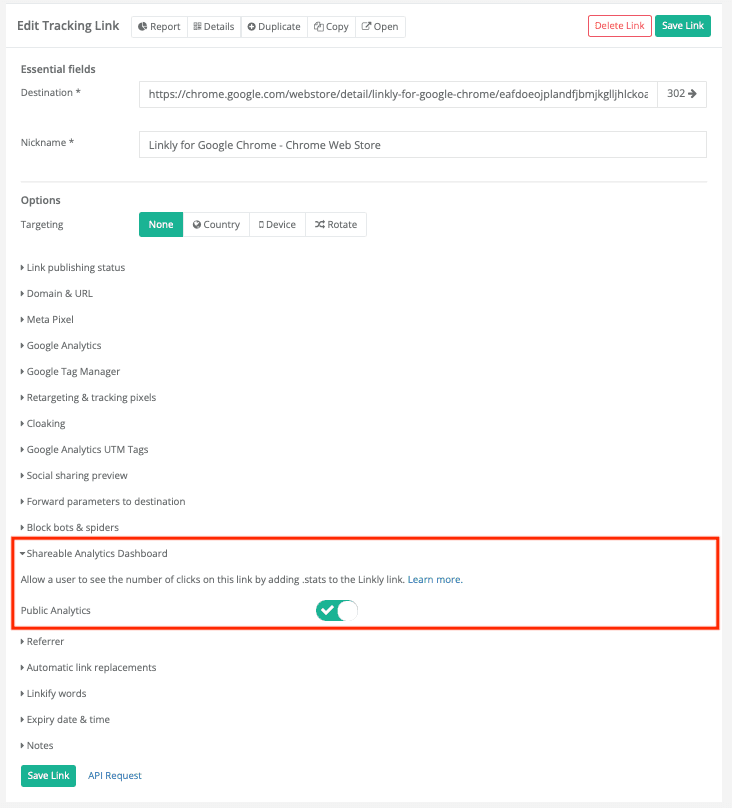
From the options, select Shareable Analytics Dashboard.
3
Save your link.
The link to the public analytics will be visible on the link details page after you save your link.
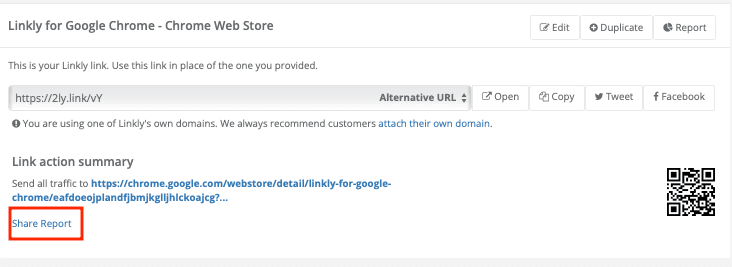
Save your link.
Sharing analytics FAQs
What can people see on the public analytics page?
The public analytics page shows the total number of clicks on the link. It does not reveal any other links in your workspace or detailed visitor information.
Plan availability
Available on Business and above
Get 100 short links and track 500 monthly clicks for free.