QR Code Generator API
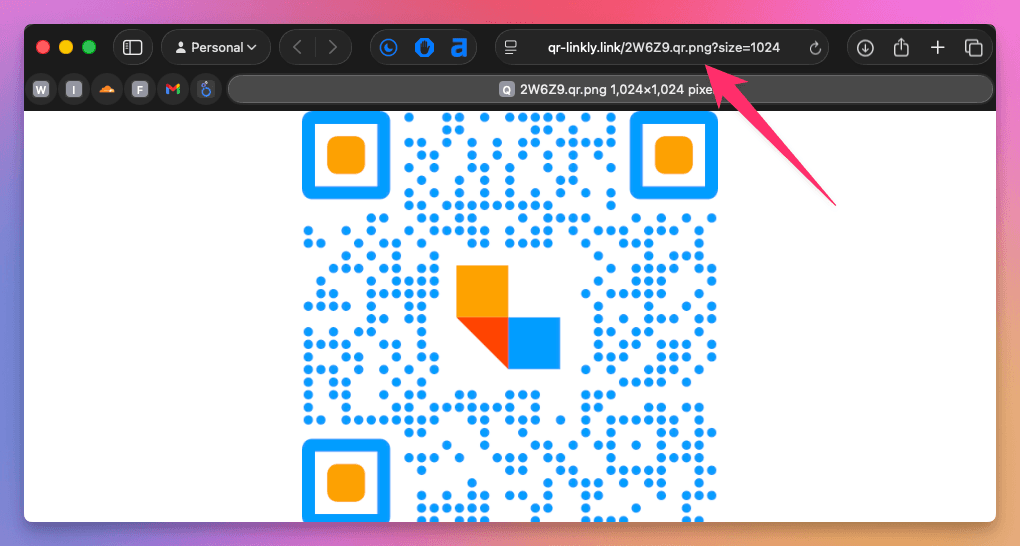
Generate QR code images by appending .qr.png to any Linkly short link. No authentication or API key required.
The image is returned as a PNG with all saved QR code styles applied, including custom colors, dot patterns, eye styles, and logos.
Basic usage
Append .qr.png to any Linkly short link:
https://linkly.link/2W6Z9.qr.png
This returns a 1024x1024 PNG image of the QR code. If you've customized the QR code's colors, style, or logo in Linkly, those styles are automatically applied.
Example
Embed a QR code in an HTML page:
<img src="https://linkly.link/2W6Z9.qr.png" alt="QR Code" />
Or use it in an email template, a PDF, or any system that supports image URLs.
Style parameters
Pass query parameters to override the link's saved QR styles or change the image size:
https://linkly.link/2W6Z9.qr.png?qrStyle=dots&fgColor=%23009eff&size=2048
| Parameter | Description | Example |
|---|---|---|
| size | Image size in pixels (100–2048) | 1024 |
| fgColor | Foreground color (hex, URL-encoded) | %23009eff |
| bgColor | Background color (hex, URL-encoded) | %23ffffff |
| qrStyle | Module style | squares, dots, or fluid |
| eyeStyle | Eye pattern style | square or rounded |
| eyeColorInner | Inner eye color (hex) | %23ff0000 |
| eyeColorOuter | Outer eye color (hex) | %230000ff |
| logoImage | URL of logo image | https://example.com/logo.png |
| logoWidth | Logo width in pixels | 60 |
| logoHeight | Logo height in pixels | 60 |
| logoPadding | Padding around logo in pixels | 10 |
| logoStyle | Logo padding shape | square or circle |
| quietZone | Padding around the QR code in pixels (0–200) | 50 |
Note: hex colors must be URL-encoded — use %23 in place of # (e.g. %23ff0000 for #ff0000).
Logo dimensions are automatically scaled to match the requested image size.
The quietZone adds whitespace padding around the entire QR code, filled with bgColor. This is useful when printing QR codes on dark backgrounds — without it, the positioning eyes sit flush against the edge and may not scan reliably. For example, quietZone=50&bgColor=%23ffffff adds a 50-pixel white border.
Setting styles via the link API
You can save QR code styles to a link when creating or updating it via the Link Shortening API. Pass a qr_styles JSON object with any of the style keys listed above:
{
  "api_key": "your_api_key",
  "workspace_id": 1234,
  "url": "https://example.com",
  "qr_styles": {
    "fgColor": "#009eff",
    "bgColor": "#ffffff",
    "qrStyle": "dots",
    "eyeStyle": "rounded",
    "logoImage": "https://example.com/logo.png",
    "logoWidth": 60,
    "logoHeight": 60,
    "logoPadding": 10,
    "logoStyle": "circle",
    "quietZone": 50
  }
}
Once saved, these styles are automatically applied whenever you request the .qr.png image — no query parameters needed.
How styles are applied
QR code styles are resolved in the following order:
- 1Default styles — Black foreground on transparent background, square modules, 1024px
- 2Saved styles — Any customizations you've made in the QR code editor or set via the Link API are stored with the link
- 3Query parameter overrides — Override individual styles per request via URL parameters
When a logo is present, Linkly automatically uses high error correction (Level H) to ensure the QR code remains scannable.
Rate limits
The endpoint is rate limited to 5 requests per second per IP address. Images are cached for 5 minutes, so repeated requests for the same QR code are served quickly.
QR code generator API FAQ
Do I need an API key to get a QR code image?
No. Simply append .qr.png to your short link URL. This is public and requires no authentication.
Can I embed the QR code image in emails or webpages?
Yes. The .qr.png URL is designed for embedding. Use it as an <img> source in HTML emails, webpages, PDFs, or any system that supports image URLs.
Are custom colors and logos included?
Yes. QR codes are rendered with all saved styles, including custom colors, dot/fluid patterns, eye styles, and logos. You can also override any style with query parameters.
What size are the generated images?
The default size is 1024x1024 pixels. You can specify a custom size from 100 to 2048 pixels using the size query parameter, e.g. ABC123.qr.png?size=2048.
Is there a rate limit?
Yes. The endpoint is rate limited to 5 requests per second per IP address. If you exceed this, you'll receive a 429 status code.
Related resources
- Create QR Codes - How to create and customize QR codes in Linkly
- Add a Logo to a QR Code - Create branded QR codes with your company logo
- SVG QR Codes - Download QR codes in scalable vector format
- Link Shortening API - Create and manage links programmatically
- Analytics API - Export click data and traffic reports
Plan availability
Available on Pro and above
Get 100 short links and track 500 monthly clicks for free.