What is a wa.me link?
A wa.me link is WhatsApp's official short URL for starting a conversation with a specific phone number. Click one and WhatsApp opens — on the app or the web — with a chat to that number ready to go. No saving the contact, no typing the number, no friction.
It's the closest thing WhatsApp has to a "digital business card," and it's everywhere: support pages, Instagram bios, email signatures, packaging, billboards in São Paulo, posters in Mumbai, restaurant menus in Mexico City. If a business runs on WhatsApp, it almost certainly has a wa.me link somewhere.
The format
A wa.me link looks like this:
https://wa.me/<phone-number>
The phone number is in international format with no +, no spaces, and no dashes. So a UK number +44 20 7946 0000 becomes:
https://wa.me/442079460000
You can also pre-fill a message that the recipient sees when the chat opens:
https://wa.me/442079460000?text=Hi%20there%2C%20I%27m%20interested%20in%20your%20pricing
The text parameter is URL-encoded — spaces become %20, commas become %2C, and so on. WhatsApp drops it into the message field; the user can edit before sending or just hit send.
That's the whole spec. No account needed, no API key, no sign-up. WhatsApp resolves the link and opens the chat.
Why people use wa.me links instead of phone numbers
Phone numbers are friction. To contact a business by phone, you have to:
- 1
Copy the number
- 2
Open your contacts (or dialer)
- 3
Paste, save, or type it
- 4
Switch apps to WhatsApp
- 5
Find the new contact
- 6
Start the chat
A wa.me link collapses all of that into a single tap. For businesses operating in WhatsApp-first markets — which is most of Latin America, India, Indonesia, the Middle East, and large parts of Africa and Southern Europe — it's not optional. It's the front door.
Common uses:
-
Customer support — "Message us on WhatsApp" buttons on websites and order confirmations
-
Sales — Lead-capture CTAs that drop straight into a sales rep's inbox
-
Marketing — QR codes on print, packaging, and out-of-home that open WhatsApp on scan
-
Personal — Freelancers, consultants, and small business owners who use WhatsApp as their primary channel
The problem with raw wa.me links
The format is brilliant, but the link itself is a dead end:
-
No tracking. You have no idea who clicked, when, from where, or which campaign drove the click.
-
No branding.
wa.me/442079460000reveals your phone number publicly and looks generic. -
No flexibility. If you change phone numbers — or want to route different campaigns to different reps — every printed flyer, every email signature, every packaging insert has to be updated.
-
No A/B testing. You can't compare two pre-filled messages or two destination numbers.
For a personal contact, none of this matters. For a business running multiple campaigns, channels, or reps, it matters a lot.
How Linkly handles wa.me links natively
Linkly now processes wa.me links as a first-class destination type. Paste any wa.me URL into the destination field and Linkly recognises it as a WhatsApp link — phone number and pre-filled message become editable fields, with a live preview of how the chat will look:
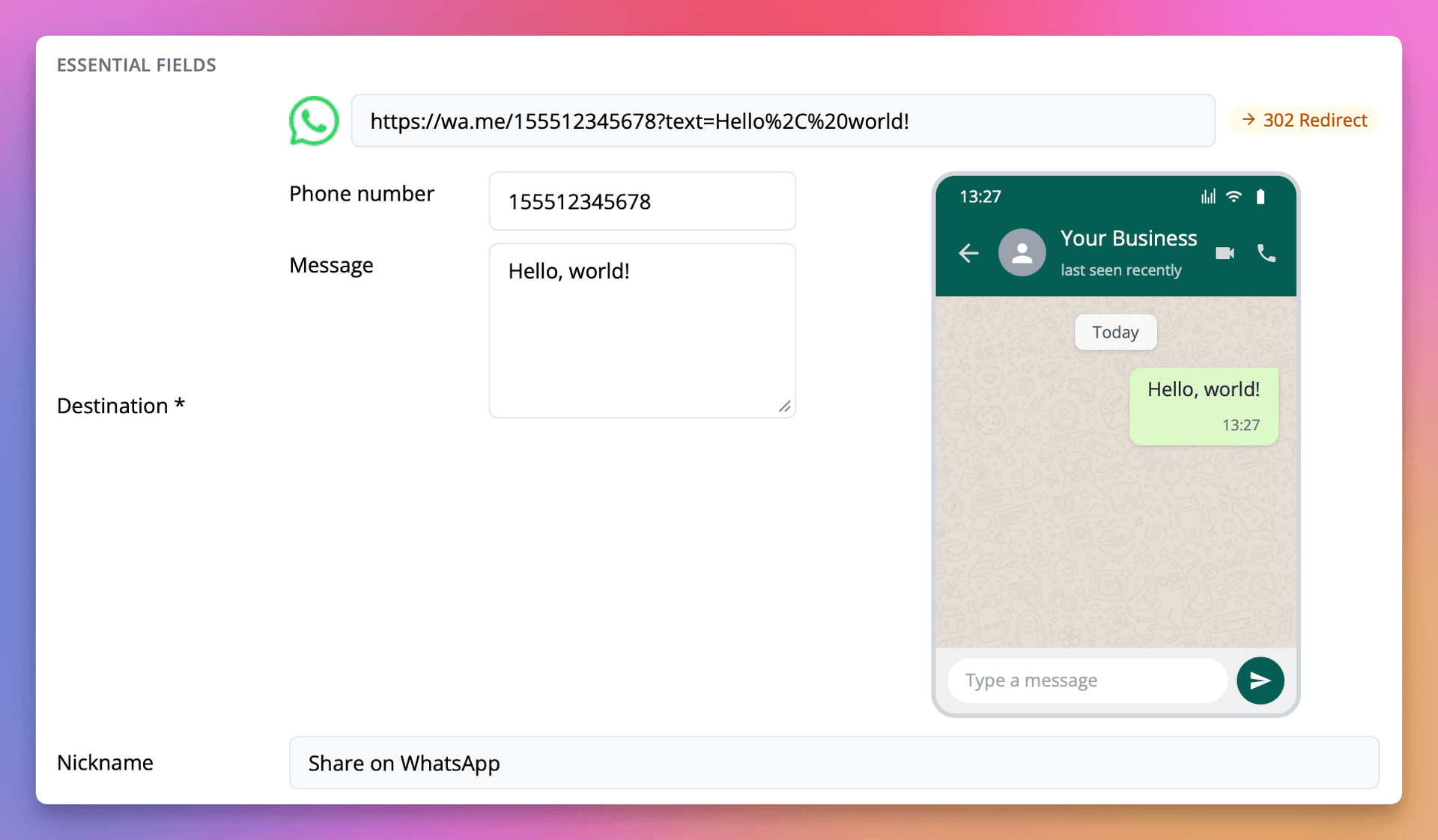
Full walkthrough in the docs: WhatsApp Link Generator.
What you get on top of the raw wa.me link:
-
Click tracking — see exactly how many people clicked, when, and from where, with full geographic and device breakdowns.
-
Branded short domains — replace
wa.me/442079460000withchat.yourbrand.com/salesusing a custom short domain. -
Editable destinations — change the WhatsApp number or pre-filled message at any time without reprinting anything. Old QR codes keep working; they just route somewhere new.
-
Geographic routing — send US clicks to your US sales WhatsApp, EU clicks to your EU rep, with geo-redirect rules.
-
A/B testing — split traffic across two
wa.medestinations to see which pre-filled message converts better. -
Retargeting pixels — fire a Facebook, Google, or LinkedIn pixel when someone clicks through to WhatsApp, so you can remarket to your most engaged leads.
-
QR codes — generate a scannable QR code for your
wa.melink to drop on print, packaging, or out-of-home.
The link format stays exactly as WhatsApp expects it. We just add a layer of measurement and control on top.
Building your own wa.me link
If you just need the URL itself, the format is:
https://wa.me/<international-phone-without-plus>?text=<url-encoded-message>
Linkly's WhatsApp link generator builds this for you, URL-encodes the message, and gives you a trackable short link in the same step.
In short
A wa.me link is WhatsApp's frictionless front door. It's free, it works on every device, and it's the dominant business-contact format in the markets where WhatsApp leads.
What raw wa.me links don't give you is visibility — or the flexibility to change destinations, route geographically, or measure which campaigns actually drive conversations. Wrap them in a Linkly short link and you keep the click-to-chat experience while gaining the tracking, branding, and routing layers a serious business needs.
Get started with Linkly — free for the first 500 monthly clicks, no credit card required.
Get 100 short links and track 500 monthly clicks for free.