
How to Use Expiring Links for Flash Sales and Limited Offers
Nothing drives action like a deadline. Expiring links add real urgency to your promotions by automatically disabling access after a set time or date. No more "I'll check it out later" turning into "I forgot about it."
In this guide, you'll learn how to create expiring links and use them effectively for flash sales, limited-time content, and exclusive offers.
What Are Expiring Links?
An expiring link (also called a temporary URL or time-limited link) works normally until a specified date/time, then stops redirecting to the destination. After expiration, visitors see a custom message or are redirected elsewhere.
This is different from a regular link that stays active forever. With expiring links, you control exactly when access ends.
Why Use Expiring Links?
Create genuine urgency: When customers know a link will stop working, they're motivated to act now rather than procrastinate.
Protect time-sensitive content: Ensure early access, preview links, or pre-sale URLs can't be used after the promotion ends.
Simplify campaign management: No need to manually disable links after a sale ends. Set the expiration upfront and forget about it.
Prevent link sharing abuse: Limit the window for unauthorized sharing of exclusive content.
How to Create an Expiring Link
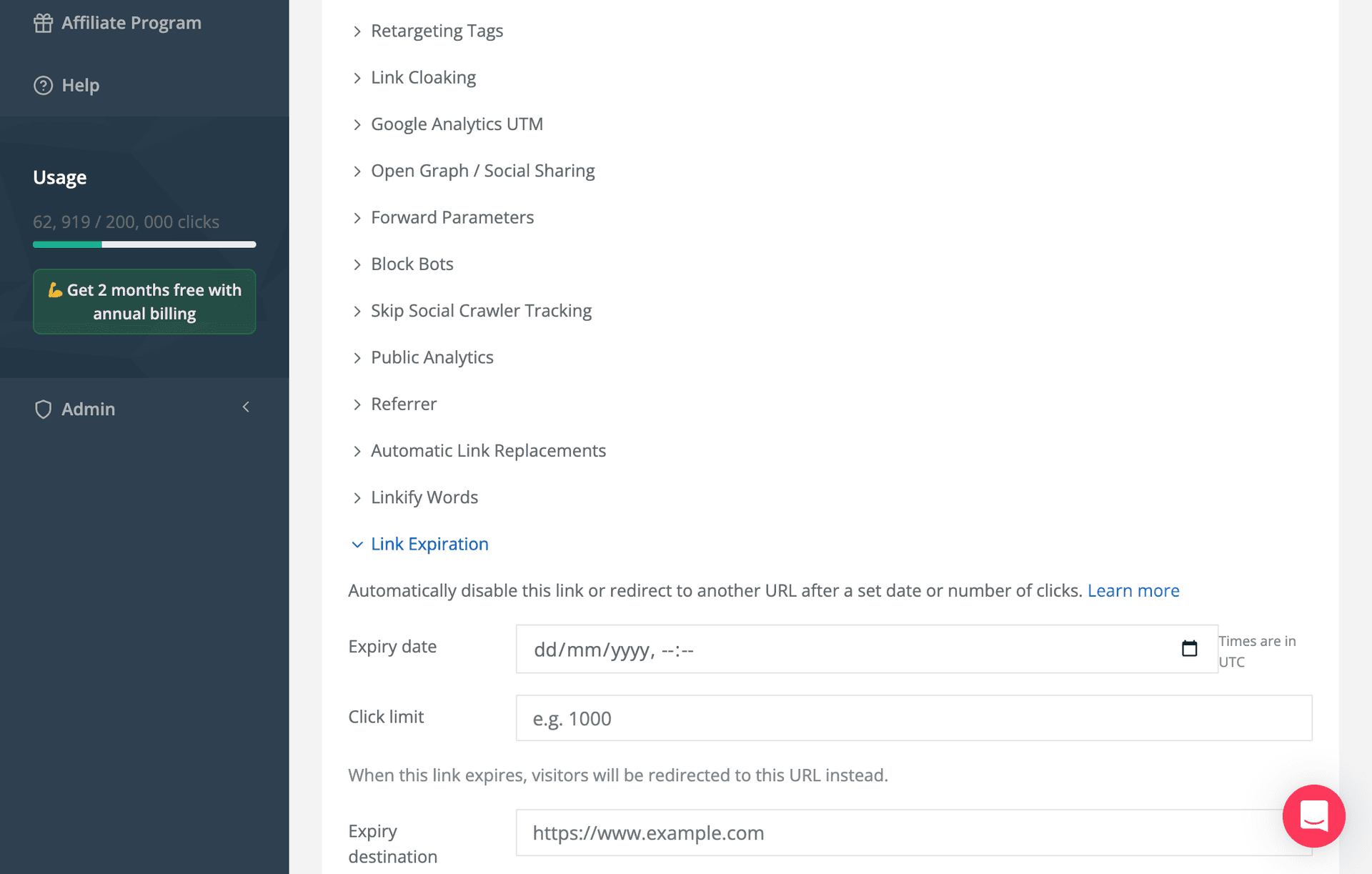
Setting up a time-limited link in Linkly takes under a minute:
- 1
Log into your Linkly dashboard
- 2
Click Create Link and enter your destination URL
- 3
In the Link Expiration section, set your expiration date and time
- 4
Choose what happens after expiration:
- Show a custom message ("This offer has ended")
- Redirect to a different URL (your main site, a waitlist page, etc.)
- 5
Save your link
For detailed instructions, see our expiring links guide.
Use Cases for Expiring Links
Flash Sales
Create urgency for 24-hour or weekend sales:
- Share the expiring link across email, social media, and ads
- Customers know the link stops working when the sale ends
- After expiration, redirect to your regular-priced page or a "sale ended" message
Pro tip: Display the expiration time in your marketing ("Link expires Sunday at midnight!") to reinforce urgency.
Early Access and Pre-Sales
Give VIP customers or email subscribers exclusive early access:
- Send an expiring link 24-48 hours before public launch
- The link stops working when general access begins
- This rewards loyalty and drives email signups
Limited-Time Content
Share preview content, beta access, or exclusive downloads:
- Webinar replays available for 7 days
- Free chapter downloads during launch week
- Exclusive podcast episodes for patrons
Event-Based Promotions
Align link expiration with real-world events:
- Conference discount codes that expire when the event starts
- Holiday promotions that end at midnight
- Product launch pricing that increases after launch week
Coupon and Discount Distribution
Prevent coupon codes from circulating indefinitely:
- Create expiring links to coupon-applied checkout pages
- Links expire when the promotion ends
- No need to manually deactivate codes
Expiring Links vs. Other Urgency Tactics
| Tactic | How It Works | Limitation |
|---|---|---|
| Countdown timers | Visual urgency on page | Can be ignored, link still works |
| "Limited quantity" | Suggests scarcity | Requires inventory management |
| Expiring links | Link literally stops working | True deadline, can't be bypassed |
| Manual link removal | Delete link after promotion | Easy to forget, extra work |
Expiring links provide genuine, automated urgency that can't be circumvented by ignoring countdown timers or hoping for restocks.
Best Practices for Expiring Links
Be Transparent About Expiration
Tell your audience when the link expires. This builds trust and creates urgency:
- "Get 30% off - link expires Friday at midnight EST"
- "Early access ends in 48 hours"
Choose Appropriate Expiration Windows
| Promotion Type | Suggested Window |
|---|---|
| Flash sale | 24-72 hours |
| Early access | 24-48 hours |
| Webinar replay | 7-14 days |
| Seasonal promotion | 1-2 weeks |
| Beta/preview access | 1-4 weeks |
Too short, and people miss it. Too long, and urgency disappears.
Set a Helpful Post-Expiration Destination
Don't leave expired-link visitors with a dead end. Redirect them to:
- A "this offer has ended" page with alternatives
- An email signup to catch the next sale
- Your main product page at regular pricing
- A waitlist for future access
Combine with Other Linkly Features
UTM parameters: Track which channels drive the most conversions during your limited-time window.
Retargeting pixels: Capture everyone who clicked, even if they didn't convert. Retarget them with "last chance" messaging as expiration approaches.
Click analytics: Monitor real-time clicks to gauge promotion performance and adjust your marketing push if needed.
Geo-targeting: Run region-specific flash sales with different expiration times per timezone.
Test Your Links Before Launching
Always verify:
- The link works before the expiration time
- The correct post-expiration behavior triggers
- The timezone is set correctly
Advanced: Click-Based Expiration
Some scenarios call for limiting total clicks rather than time:
- "First 100 customers get 50% off"
- "Limited to 500 downloads"
While Linkly focuses on time-based expiration, you can monitor click counts in your analytics and manually disable the link when you hit your limit. For fully automated click limits, consider combining Linkly with Zapier to trigger an action when click thresholds are reached.
Example Campaign: Product Launch Flash Sale
Here's how an e-commerce brand might use expiring links for a product launch:
Day 1-2 (Pre-launch):
- Send expiring link to email subscribers for 48-hour early access
- Link expires when public launch begins
Day 3-5 (Launch):
- Create new expiring link for launch-week 20% discount
- Share across all channels with clear "ends Sunday" messaging
Day 6+ (Post-launch):
- Links redirect to full-price product page
- Visitors see "launch sale ended" message
- Capture emails for next promotion
Tracking Expiring Link Performance
Your Linkly analytics show:
- Total clicks during the active window
- Click patterns over time (useful for optimizing future sale timing)
- Traffic sources and geographic distribution
- Device breakdown
After the campaign, analyze what worked:
- Did clicks spike as expiration approached?
- Which channels drove the most traffic?
- What was the conversion rate compared to non-expiring campaigns?
Conclusion
Expiring links transform artificial urgency into real deadlines. When a link genuinely stops working, your audience has to decide now, not later. Used strategically for flash sales, early access, and limited-time content, expiring links can significantly boost conversion rates and campaign effectiveness.
Ready to create urgency that converts? Get started with Linkly and set up expiring links for your next promotion in less than a minute.
Get 100 short links and track 500 monthly clicks for free.